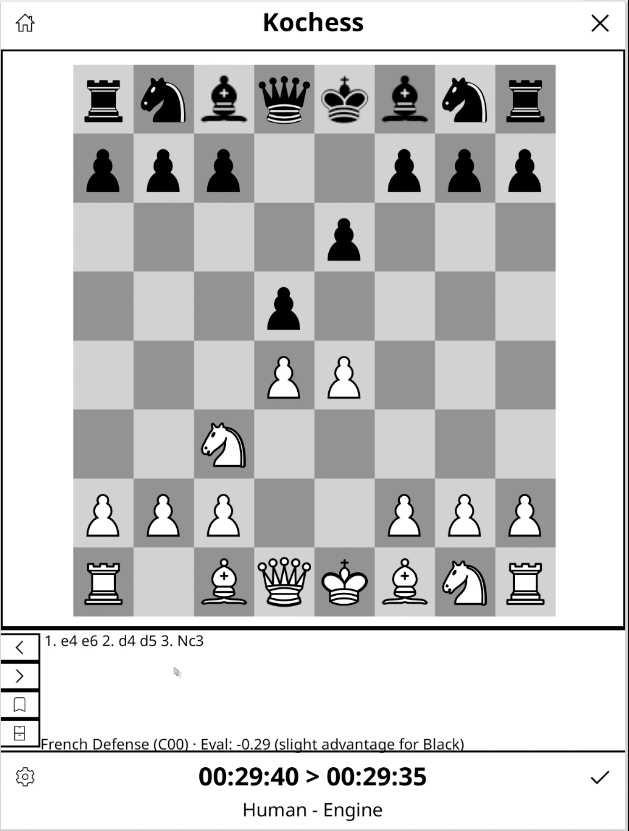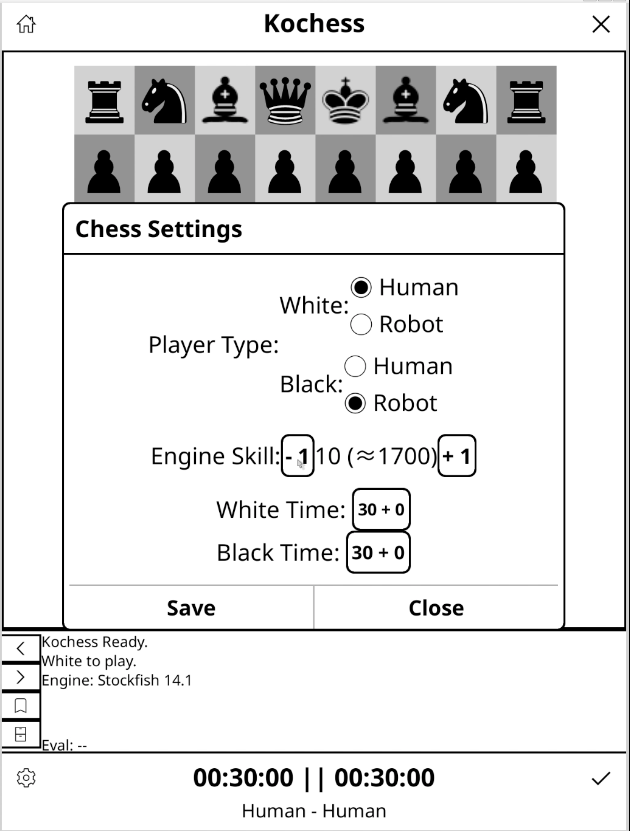
Kochess is a KOReader plugin that adds a chessboard to the reader's screen. It installs inside KOReader, appears in the tools menu as "Chess Game", and opens an eight-by-eight board with pieces drawn using local icons. There is no web view or external resources: each square is a button from the host environment.
You can play against Stockfish or between two people on the same device, choosing separately which color each player controls. Kochess is not a product of KOReader or Stockfish: it relies on the former as an environment and uses the latter as a local engine. The project continues original work by Baptiste Fouques and is published under the GPL-3.0 or later license.
Why it exists
The problem it solves is small and specific: having chess inside the reader, offline, without accounts, and without anything interrupting the game. Everything happens on the device: the rules, the openings, the PGN files, and the engine. Kochess does not query any external service.
What makes the project interesting are the constraints. An e-ink screen refreshes slowly and has few colors, the device is small, and yet there is a real chess engine calculating moves while the interface remains responsive. Almost all the code decisions come from there.
Status
It is a prototype in development. The last commit in the repository is from January 15, 2026, adding numbers and letters on the board edges, and the recorded history ends on that date.
What it does today
Board and rules
- Display an eight-by-eight board with white and black pieces and coordinates on the edges.
- Select a piece by tapping its square and then the destination square; the selected square is marked by darkening the background.
- Validate moves with the local library: castling, en passant captures, promotions, checkmate, and draw positions.
- Ask for the promotion piece with a dialog for queen, rook, bishop, or knight.
- Notify with a dialog when the game ends in mate.
- Restart the game from the top bar.
Engine
- Launch Stockfish as a local process and communicate with it via the UCI protocol.
- Send the position and the move sequence and apply the
bestmovereturned by the engine. - Adjust the skill level between 0 and 20.
- Show the evaluation in centipawns and mate positions, translated into texts like slight, clear, or decisive advantage.
- Choose approximate thinking times of 0.3, 1.5, 3, or 5 seconds, plus one thread and a hash table size fixed at startup.
Clocks
- One clock per color, with initial time and increment per move, hours, minutes, and seconds format, and pause or restart when closing or restarting the game.
PGN, openings, and evaluation
- Move history in standard algebraic notation, scrolled to keep the end visible.
- Save the current game as
.pgn, choosing folder and name; by default, the plugin'sGamesfolder. - Load a PGN with KOReader's file picker, which reconstructs the position and shows its final state.
- Detect the opening by comparing the move sequence with
aperturas.jsonand show its name and ECO code, choosing the longest match.
How it's made
The entry point is main.lua, which registers the action in the KOReader menu, installs the plugin icons, and builds the game screen. From there, the work is divided among several files:
board.lua: draws the board, shows the pieces, and applies the moves.settingswidget.lua: player settings, engine level, thinking time, and time controls.timer.lua: the clocks for both colors.uci.lua: launches the engine and speaks UCI with it.utils.lua: communication via pipes, non-blocking reading, and callbacks with KOReader's scheduling.chess.lua: rules, legal moves, SAN notation, FEN, PGN, promotions, castling, en passant captures, and game states.aperturas.json,engines, andicons: the opening table, the engine binary, and the piece and square icons.
The part that least resembles a typical Lua plugin is the engine. Kochess runs it as a separate process, connects its inputs and outputs via pipes, and handles them with fork, execvp, and poll through FFI, processing responses like uciok, readyok, info, and bestmove. It's an uncommon decision in Lua, but it fits with the Linux underneath KOReader.
The history shows that the included binary for Kobo was updated to Stockfish 15 in January 2026, and that binary is about 48 MB. The README still mentions Stockfish 11, so that reference is outdated. The chess logic comes from chess.lua, a Lua library derived from chess.js.
The repository includes a Busted test suite for that library, with cases for perft, move generation, checkmate, draws, promotion, castling, and algebraic notation. They cover the chess logic, not the full plugin: the interface, engine, clocks, and PGN flow have no visible equivalent tests.
What I find interesting to tell
The board on e-ink
Each square is a KOReader button and each piece an icon. Selection is communicated by darkening the square's background instead of with animations or bright colors, which don't exist on this screen. It's a concrete example of how to adapt a game interface to slow refresh and a reduced palette.
A complete move against Stockfish
- Tap a piece and then the destination square.
- The local library validates and applies the move.
- The SAN notation enters the history.
- The active clock changes.
- Kochess sends the position and move sequence to the engine.
- Stockfish responds with a
bestmove. - Kochess translates that UCI move to its internal representation and updates the board.
The walkthrough serves to show how rules, presentation, clock, and engine are separated into pieces that don't step on each other.
Talking to an external process
The engine is not a function that is called and returns a value: it's a process that is launched, writes when it can, and takes as long as it takes. The interface must remain responsive in the meantime, and that's why utils.lua reads from the pipes without blocking and queues callbacks. Decisions like fixed thinking time, instead of letting the engine manage the game clock, come from that same architecture.
Two pieces of information that hardly resemble each other
The opening and the evaluation appear together on screen, but they are obtained in different ways. The name and ECO code are recognized by looking for a match between the move sequence and a local table; the evaluation is calculated by Stockfish for the current position. One is retrieval, the other is calculation.
Pawn promotion
When a pawn reaches the last rank, the move is not applied when tapping the destination: a dialog with four pieces opens and the decision returns to the main screen. It's a case where the interaction needs an extra step before modifying the board.
Code and credits
The code is in the Kochess public repository, which also includes a demo video. The original work the project is based on is by Baptiste Fouques.