Buscando un PC/Mac para ver DivX en la TV del salon de casa
 Uno de mis proyectos mas perseguidos es poder ver la tele en el salón de mi casa y recibir en la misma tele la notificacion de un correo nuevo o de que alguien que esperaba se conecte al Jabber o al yahoo de mi ordenador de casa.
 La estructura de mi casa es como la de cualquier casa normal, un monton de ordenadores en una habitacion (habitualmente impenetrable) conectados a internet y en el salon/sala todo ordenadito con Television grande que te cagas, DVD, Home cinema y demas pijadas.
Pues bien el reto es poder ver todas las peliculas (ripeadas para guardar la copia de seguridad pertinente) almacenadas en un disco duro de la habitacion en la television grande que te cagas del salon.
Las alternativas barajadas son varias :
- Usar un set de cinema que estan de moda ultimamente. con un transmisor en el ordenador de la habitacion y un receptor en la TV del salon.
- Usar un Barebone , que es un Pequeño y estiloso PC que se pone en el salon y se le instala software apropiado para ver pelis, DVDs, etc ...
- Comprar un Mini Mac. Este es un hibrido entre los Mac de siempre y un barebone. De reducido tamaño, estiloso y potente.
La decision es dificil. El modelo mas interesante del segundo punto es el AOpen XC Cube AV (EA65) La web del mini mac es la de apple Mac Mini
Los pros de comprar un Barebone son muchos, si todos los componentes funcionan con linux se pueden traer las pelicular por WI-FI y reproducirlas directamente. Los Cons es que produce mas ruido que el Mac Mini.
JLibrary, a repository for personal and corporate Documentation
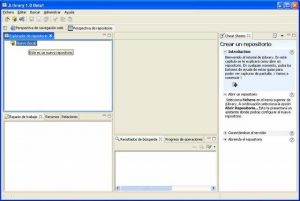 On the last days i joined the JLibrary team to try to help a bit on the development of this excelent program. The project has the Goal of creating a JSR-170 compatible driver. Jlibrary uses the filesystem to store all corporate (or personal) documentation, it also tracks versions maden to the documents on the repository. The interface is build around Eclipse Rich Client Platform, so its easy to use and has a nice look.
You can download the project or look at the tutorials at the projects page here Thats a short feature list:
- Local and remote repository of documents.
- Inline editing of documents.
- Document Categories
- Metadata management on every document added
- Security based on roles, groups and users.
- friendly look and feel
- i18n
- lock of documents while any user are editing it
Well, thats a short list of features , look at the web page for more info.
Java Admin Users, a interafce to admin LDAP Users and GrRoups
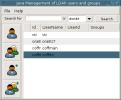 On the last months i start the development of another program, Its codename is JAdminUsers.
JAdminUsers is a Java program that uses SWT as a look and feel framework. Its main goal is administer and maintain LDAP users and groups on a distributed system.This days I am administering a large corporate where all users are maintained at hand . We started to migrate all systems (Solaris, Digital Unix and Linux) to use a central LDAP repository, but we need a tool to add/delete and modify users. The few applciations we can find on the web are useless. Thats the main reason i start the development of JAdminUsers.
Yo can view the project at his wiki There are a few screenshots too. Current version is 0.3 and Webstartable.
Google, Perl, Java y otras lindezas
 Los chicos de Google acaban de sacar el google desktop search, herramienta cojonuda donde las haya para indexar nuestro disco duro (mientras no hacemos nada) para luego poder buscar palabras en nuestros correos, mensajes de ICQ o archivos del disco duro. Vamos que es lo que estabamos esperando (al menos yo).
Otra cosa interesante es el GMAIL, supongo que todo el mundo tiene una cuenta ya, pues lo interesante es el sistema de archivos para GMAIL (GmailFS ) que nos permite escribir en la unidad y aparece instantaneamente en nuestro correo de gmail, pudiendo usar el 1GB de espacio disponible para backups o para lo que queramos. Asi mismo tambien hay utilidades para linux como el gmcp para hacer copias remotas entre el espacio de gmail y nuestro disco duro. Otra utilidad interesantisima es la API PERL para comunicarnos con GMAIL, se llama Mail::Webmail::Gmail y la podeis instalar desde CPAN directamente. Es sencillisimo adaptar alguno de los scripts que ya trae para hacer una copia automatica de vuestros datos a la cuenta remota de gmail. El script que yo uso de backup hacia mi cuenta de gmail lo podeis encontrar en mi wiki: Perl Scripts
SVG extension to Mediawiki, more cool stuff
 I develop another extremely simple (but cool) extension to mediawiki, it works like the Graphviz extension, and it uses Batik from Apache as an SVG to png render. The extension is about sharing UML graphs or Images on a developers team. With this you can use Your favorite UML modeller (Together, Argo, Omondo, ...) and export the format to SVG, them you can put on the wiki and at least another developer/analist can modify the XML on the wiki, and show results online.
You can view this plugin in action at my wiki Yo can download and test it on the project information page of the wiki. All comments and suggestions are welcome
Mediawiki Extension to make graphs online
 I recently created the Graphviz extension to mediawiki, its a simple extension written in php to let users and editor create graphs online with a simple language, the script uses graphviz available for free on graphviz site
With this plugin you can do things like the ones listed on this site
You can download the extension from Graphviz wickle CVS
Instructions on installing and using tis plugin are available on my wiki here
Attack the bugs with Bugzilla and a cool interface ...
For a long time i am looking at a great interface to a bug tracker, the best bug tracker i know is bugzilla, but it have a terrible ugly interface, so i keep looking for another bug tracking systems, on this work i found a lot of systems :  mantis bug tracker flyspray (the best interface of all) and a lot more ...
but this ones are all of inferior quality of bugzilla, so i try to make a template to bugzilla, with no success.
So when i am going to forget it, i look at mediazilla, bugzilla interface of mediawiki(the wiki of wikipedia), and i like it very much ... so i talk at irc with TimStarling (thanks man) who send me the template of it . I put the template to download here. you can view it in action at my bugtracking page.
Wickle Projects and Docs Wiki Started
 I recently discover the many uses and features of WIKIs and I started my own WIKI to maintain documentation on my own projects and to share ideas with other projects developers, so anibody can share and help my projects . The address is http://www.wickle.com/wikis
Apache Maven to substitute ant ...
The new tool from Maven takes me a headeache and a few days of configuration and learning about it, but in the end i think its a valuable tool and will be simplify my java developments. You can view my new JDiary home generated enterely with maven at the same time that I generate the JNLP to distribute.
What is Maven: Maven is a Framework for ant. Its POM (project object model) based and with a couple of files you can build the application, generate test reports, and an entire site for the application.
Overview:
All round about one file : project.xml here we define the name of the application, the jars it depends on, where are the CVS, and more information. see sample at the end of the POST. The sencond important file is project.properties. It store information about plugins properties for maven (as JNLP, SSH deployment, etc ...) again i post my sample file at the end. The last file is maven.xml (rarely you must modify or create it) but on this case it store ant scripts we need (because maven does not do all ) and goals (on the ant style) to build the application with our own rules.
Sample of starting a new application:
First of all you must download maven Install it (its very simple) I recomend use eclipse as you IDE , there are a plugin to eclipse to build maven files. Then you must start using maven (put it on the PATH) with maven -g or maven genapp, well read the tutorial here Some Samples : With maven jar you complie the sources. With maven site:generate you generate the entire site to your application. With maven site:deploy maven will generate a site for your application with download sections, Overview, Documentation, Javadoc, tests , etc ... like on my project JDiary
Problems i found
There are still very little Documentation .
Very little documentation ...
Its hard to start ( but i recommend to spend 1 or 2 days on this tool)
Some options I put on my xml files are undocumented and i put them using the intuition (such as maven.jnlp.isapplication = true in JNLP plugin) On the other side YOU MUST INSTALL cvs to make a cvs -d:pserver:cvs@yourserver:/cvsroot login to initialize the .cvspass on Windows machines. Instead of that you can create a .cvspass on your HOME with a content like this : /1 :pserver:cvs@CVS_SERVER:2401/usr/local/cvsroot ENCRYPTEDPASSWORD the encrypted password is obtained with maven changelog:create-cvspass Errors associated with this issue: -> Didn 't find password for CVSROOT ':pserver:user@(protected):/repos '. -> org.netbeans.lib.cvsclient.connection.AuthenticationException: Wrong Password. and more ... only for the CHANGELOG plugin
Sample Files : Because the tedios labour of pasting XML code on my blog, you must use the CVS repository to see my files.
Howto Maintain a large number of sites centralized with Jabber.
 Page of the project The problem I find at my work was the next :
The problem:
When you maintain and update a large number of unix (or windows) machines you must review if all machines are UP, and in case of failure you must do something (well it depends on admin ;) ), also you would like to review if all goes well before a weekend ( admins tends to me very vagues).
The solution:
The architecture of the application is simple: you must rely on a machine (the central server or backup server) here you install NAGIOS (http://www.nagios.org/download/), this is a program in C that monitors the health of each server. You must configure a lot of archives (it takes a half day or so but its nice) in which indicate what servers to monitor and wich service offers each server, the alerts, the methos of communication and so on ... Ths next step (when you install nagios and test it) is to install sendJabber ( only on CVS at the moment) configure it with a valid account on a jabber server and tell him the user/users to send alerts. The next is configure again Nagios to send alerts throw sendJabber its so simpe sa adding a line to misccommands.cfg , then you must restart Nagios and all is OK. Just sit in front your computer and if something fails you must receive an alert on your Jabber client (I recommend GAIM )
I will post a more extense howto on the next days.
TODO:
On future releases onf sendJabber you can intereact with NAGIOS server, send commands and receive status about servers. and more ...
Sígueme !!


Blogroll
Categories
- Dibujo (2)
- Escalada (4)
- Libros (1)
- Macosx (1)
- Personal (15)
- Proyectos (19)
- Recetas (3)
- Tecnología (79)
- Viajes (1)
Archive
- August 2019 (1)
- June 2019 (1)
- May 2019 (2)
- March 2013 (1)
- August 2012 (2)
- December 2011 (1)
- October 2011 (1)
- August 2010 (1)
- December 2009 (1)
- June 2008 (1)
- May 2008 (1)
- September 2007 (1)
- August 2007 (1)
- July 2007 (4)
- June 2007 (2)
- May 2007 (1)
- April 2007 (1)
- March 2007 (1)
- February 2007 (1)
- January 2007 (1)
- December 2006 (1)
- October 2006 (1)
- September 2006 (3)
- July 2006 (2)
- June 2006 (2)
- May 2006 (3)
- April 2006 (1)
- February 2006 (2)
- January 2006 (1)
- December 2005 (1)
- November 2005 (1)
- October 2005 (1)
- May 2005 (2)
- March 2005 (1)
- February 2005 (5)
- January 2005 (2)
- December 2004 (1)
- October 2004 (3)
- September 2004 (2)
- August 2004 (1)
- July 2004 (2)
- June 2004 (2)
- May 2004 (1)
- March 2004 (1)
- February 2004 (2)
- December 2003 (2)
- November 2003 (1)
- October 2003 (2)
- September 2003 (2)
- August 2003 (3)
- June 2003 (3)
- May 2003 (4)
- April 2003 (4)
- December 2002 (1)
- July 2002 (4)