Small Linux box to view DivX,MP3,TV,News,Inet and more on TV ... aka TopBox
 Goal : The goal is to build a system (hardware and software) on which i can view all my collection of DivXs,MP3 and DVDs remotely, because i have all films on a big Hard Drive on another Linux System (Debian 3.0).
The hardware i am looking for is : VIA EPIA-M 9000 Mini-ITX Mainboard or VIA EPIA M10000 Nehemiah (137 eur.aprox ) the case (look one) 512 MB RAM wireless card D-Link 512+
the only PROBLEM i have is to boot up from a wireless network card ... http://www.viaarena.com/?PageID=281
links : [http://linuxathome.net/reviews/via\_epia\_m\_900001.php](http://linuxathome.net/reviews/via_epia_m_900001.php) [http://linitx.com](http://linitx.com) [http://linpvr.org/](http://linpvr.org/) [http://www.mythtv.org/](http://www.mythtv.org/) [http://www.viaarena.com/?PageID=58](http://www.viaarena.com/?PageID=58)Changes 02-jan-04 :
I finally decided tu reuse an "old" computer with the following configuration :
- Athlon XP 2000 Mhz (64 € ) (the old one fire up ;) )
- GeForce 4 MX440 with TV-OUT of course (50 € )
- A borrowed Avermedia TV TUNER (69 € when i buy it)
- Probably D-link DWL-520+ for Wireless connection to network
Simon Says on J2ME
 I start to develop a new porting of Simon Says , One of the best games i like to play. The main difference with the rest of the Simon Says games is that it may be a portable game (for all devices J2ME capables, applets and java frontend) it may have a network secuence of the day, on that, people can compete for make the longest secuence, for these characterisc a user must register, and play with a mobile or PDA. on a few days I release the beta, with nice graphics and sound.
New project: Mantain an Monitor a large group of Linux servers
 The problem : Them work of mantain a bunch of linux servers is hard ... when you have 1 or 2 is easy to mantain it, but when the number of servers grows to 10 or more , and when each one need a monthly maintenance (upgrade packages, install new applications, ...) the problem is BIGGER ...
At the moment i could not find any solution to this problem. Beacause of that i am starting to develop a group of applications to manage these problem
the solution / the application The application must be on java (to port to another operating systems if needed) there must be a number of clients for every server you must mantain and a server (or 2 for data reduntant) . The java clients must send data (UDP i think) every minuto or so with status information (ENCRIPTED i think), a java client console on a desktop must connect to the server and can view all information from the administrator servers. At the first phase of the project the only purpose is to view data (like on snmp) on the servers distributed, from a java client (or browser maybe) The second state must be to interact with these servers remotely and at the same time on groups of any number of servers (for ex. reboot all, od change data on all or install package A on all at the same time). These operation will need a password obviously. In the next days i start these proyect on Sourceforge and ALL cooperations will be welcome.
Ricochet Robot on J2ME v0.9
 This is a tryinf of build a porting of the classic game boar Ricochet Robot on a J2ME style , its my first J2ME and don\'t expect a lot of features ... Is developed under JBUILDER with mobileset pack, but i am currently migrating to eclipse. The test hardware is a Siemens S55 Ricochet Robot web game is on http://www.wickle.com/ricochet The objective of this game is to place the indicated robot on the finish chip, for that end you can move on 4 directions only and the robot stop walk when it finds an object or a wall.
Screenshots and Features (english only) .... Plans to implement:
- Play over the net with online updating of scores with ither players.
- Play with Multiple people simultanously (via bluetooth)
- Adapt to all screen types , currently it try to adapt but on some cases it fails.


 This software is GPL . download here. Make donations is you find this application useful ;)
HP DL380 G3 Debian Linux Howto
 A new fabricant problem surges when you try to install linux (particulary debian) on some hardware . The Hardware is a Xeon Rack , the ProLiant DL380 Generation 3 consists of :
Compaq's SMART Array Controllers Broadcom Network Card
the rest of the hardware installs well .
Installation Disks and hard drive support
When you try to install debian the first problem is the install disks (the set of disks with 3.0 version)does not contain drivers for hard drive. I download a set of disks from the Debian homepage, the set are : Disk1 : root.bin (from /3.0.23-2002-05-21 Imagenes/images-1.44/bf2.4) Disk2 : rescue.bin (from /3.0.23-2002-05-21 Imagenes/images-1.44/bf2.4)
with that disk set the installation must contain drivers for Compaq\'s SMART Array Controllers (cciss drivers if you want to compile at hand) Then you can install Debian from this install disks. When you finish that, you must compile a kernel (or use one from apt-get) and put the drivers for the network card.
Network Card
Download drivers for Broadcom 57xx NIC (BCM5700 particulary) from www.broadcom.com and the archive is : linux70.zip Next you must compile the kernel, and install it, read kernel howto . The next is compile and install the drivers for the NIC.
#unzip linux.zip #tar xzvf bcm5700-7.0.0.tar.gz it creates a directory hierarchy like this : Server/Linux/Driver/bcm5700-7.0.0/src go to it : #cd Server/Linux/Driver/bcm5700-7.0.0/src #make this creates bcm5700.o (try it with insmod bcm5700.o)
copy it to /lib/modules/2.4.18/kernel/drivers/net (substitute 2.4.18 for your kernel version) add this line to /lib/modules/2.4.18/modules.dep /lib/modules/2.4.18/kernel/drivers/net/bcm5700.o:
next execute : #depmod -a
and voila, you can restart and install it at boot time with /etc/modules.conf alias eth0 bcm5700 /etc/modules eth0
Note: The installation on Suse 8.0 does not require install disks, the drivers cciss are included on the cdrom kernel.
good luck
D-Link DWL-650+ under Linux HOWTO
 D-link has announced that Linux drivers for the + generation of 802.11b cards that produces would be published in early January 2003. Such thing did not happened as yet. The chip that ships with DWL-650+ is acx100 by Texas Instruments, and the driver we will use is the acx100_pci from http://acx100.sourceforge.net ... Due to the problems i find when i am looking for a HOWTO to these setup i decided to make one when i finish configure the DWL-650+ under linux
Tested under : I use Redhat 9.0 , and Debian 3.0 , the Laptop is a DELL inspiron 8200, the wireless PCMCIA card was a D-Link DWL-650+ (the + is the key ;) ) and the access point is a US Robotics 2249. the steps taken here is completly independient from the linux distro version
To install this card on linux we need : 1. the kernel sources , I will use 2.4.22 2. Wireless configuration tools ([http://www.hpl.hp.com/personal/Jean\_Tourrilhes/Linux/Tools.html](http://www.hpl.hp.com/personal/Jean_Tourrilhes/Linux/Tools.html)) 3. the driver acx100\_pci for linux , download it from CVS (or latest version) on http://acx100.sourceforge.net 4. install CD of DWL-650+ or windows files for this wireless card Steps to make the driver works:-
1. Compile a new kernel with at least : CONFIG_EXPERIMENTAL=y CONFIG_MODULES=y CONFIG_KMOD=y CONFIG_NET_RADIO=y
-
2. install tools from http://www.hpl.hp.com/personal/Jean_Tourrilhes/Linux/Tools.html iwconfig, iwspy and iwpriv must be installed from the deb or rpm package .or if you prefer from tarball sources.
-
3. Configure and compile acx100_pci drivers # tar xzvf acx100-0.1h.tar.gz on /rootput the next windows files (or from DWL-650+ install CD) on the directory acx100/firmware : RADIO00.BIN RADIO11.BIN WBLAN.BIN (it may be on uppercase)
#make
-
4. install the driver : copy recent compiled driver acx100/src/acx100_pci.o to /lib/modules/2.4.22/kernel/drivers/net modify modules.conf (add these 2 lines) :configure parameters to install modules with insmod alias wlan0 acx100_pci options wlan0 debug=0xb firmware_dir=/root/acx100/firmware
-
5. test the driver # insmod acx100_pciit must show a little debug information about the driver and the firmware . Be sure the directory /root/acx100/firmware contains the 3 files of Windows install or from install CD.
lsmod must show : # lsmod Module Size Used by Not tainted acx100_pci 181952 0
-
6.Configure parameters and network: # ifconfig wlan0 192.168.0.10 netmask 255.255.255.0 up # iwconfig wlan0 essid myapessid mode managed channel 6 key off rate 22Messid is the ESSID name of my AP mode must be managed for wireless-ap or Ad-Hoc to use without AP KEY off is to use wireless without encryption rate 22M is working for me , if troubles use rate 11M
# ping 192.168.0.202 PING 192.168.0.202 (192.168.0.202): 1024 data bytes 1032 bytes from 192.168.0.202: icmp_seq=0 ttl=128 time=2.4 ms 1032 bytes from 192.168.0.202: icmp_seq=1 ttl=128 time=2.1 ms ..snip..
Dont forget to use logs : /var/log/messages That's all Folks
LCD remoto
Objectivo: Tener informacion del estado del equipo linux mediante lcd4linux desde cualquier lugar de un piso mediante un panel informativo LCD ( este por ej.: http://www.crystalfontz.com/products/633/index.html). El unico problema es que todos los LCDs de este tipo son mediante puerto serie (RS232) y necesito que sea remoto, para poder obtener informacion desde cualquier lado de la casa.
Encadenando HIO en Tope Rope
Por fin cayó quien tenia que caer, la via del acantilado mas alto que habiamos practicado hasta el momento (21 mtrs.), graduado en 6a (aunque sinceramente parece un poco inferior) y sin realizarlo perfectamente, pues en algun momento nos daba la impresion de_salirnos_ de la via, pero la satisfaccion de llegar a esos 21 mtrs solo con las manos y los pies, es suficiente para mirar al acantlado y sacar la foto de rigor. La roca es Donon Oeste y la via es Costo Culero, consta de grietas diagonales, y un pequeño desplome, mucho viento y buenos empotramientos de pierna, y medio cuerpo ;), la descripcion tecnica es "Continuidad de movimientos endocentricos".
Figueras, la peor escuela de Galicia
Pese a lo que se comentaba por Internet y mas que nada por falta de tiempo nos pusimos a inspeccionar la escuela de escalada Figueras . Por su proximidad a Santiago de Compostela era perfecta, pero no todo iba a ser bueno ... La primera roca que nos encontramos fue la ultima que aparece en Galicia Vertical El Pez , un acceso a traves de Toxos desde la carretera. Aqui eran todas las vias (4 solamente) de fuerza, desplomadas entre 6a y 6a+ muy chulas eso si. La siguiente roca tuvo un acceso mas complicado (tambien a traves de toxos) pues no se ve bien desde la carretera (a la altura de la farola con el Bando Parroquial hay un camino para los que vayan a ir), el sector es El Castillo , de unos 15 mtrs. y de dificultad IV+ y V+ de adherencia, el problema era la cantidad de musgo de la roca que la hacian muy insegura y fea. En este momento nos dieron las 10 de la noche y no se veia un carajo asi que nos piramos.
El Collarada ( 2886 mtrs. )
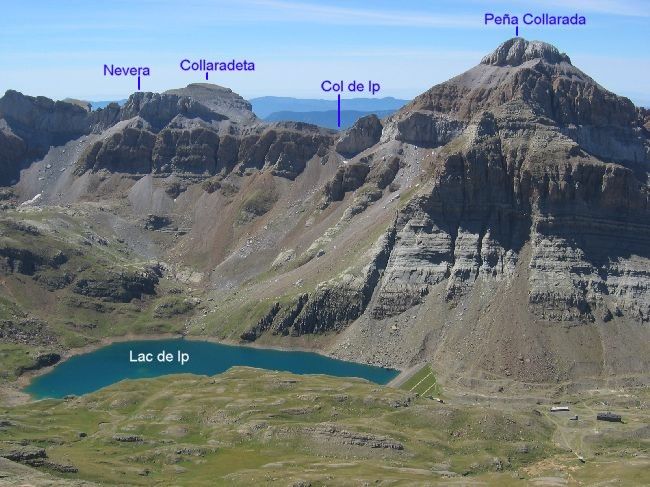 El Collarada es una de las mas caracteristicas y mejores montañas del oeste de los Pirineos. Sus 2886 mtrs. no tienen nada que envidiar al resto de los 3000 de los pirineos, con un desnivel de 1600 mtrs fue la montaña mas dura que he subido. no creo que repita ;). La ascension nos llevo unas 5 horas, 2 fuentes de agua durante el camino, una en el refugio del ibón de IP (2100 mtrs.) y la otra en el collado de Ip (2590 mtrs) justo antes de iniciar la definitiva ascension. Si subiis no olvideis una cita en un pedazo de papel para dejar en el buzon de la cima. Aunque nuestro primer objetivo era el "Pic du Midi d'Ossau" (2884 mtrs.) tuvimos que dejarlo pues la niebla era bastante intensa y el tiempo tendia a empeorar.
Sígueme !!


Blogroll
Categories
- Dibujo (2)
- Escalada (4)
- Libros (1)
- Macosx (1)
- Personal (15)
- Proyectos (19)
- Recetas (3)
- Tecnología (79)
- Viajes (1)
Archive
- August 2019 (1)
- June 2019 (1)
- May 2019 (2)
- March 2013 (1)
- August 2012 (2)
- December 2011 (1)
- October 2011 (1)
- August 2010 (1)
- December 2009 (1)
- June 2008 (1)
- May 2008 (1)
- September 2007 (1)
- August 2007 (1)
- July 2007 (4)
- June 2007 (2)
- May 2007 (1)
- April 2007 (1)
- March 2007 (1)
- February 2007 (1)
- January 2007 (1)
- December 2006 (1)
- October 2006 (1)
- September 2006 (3)
- July 2006 (2)
- June 2006 (2)
- May 2006 (3)
- April 2006 (1)
- February 2006 (2)
- January 2006 (1)
- December 2005 (1)
- November 2005 (1)
- October 2005 (1)
- May 2005 (2)
- March 2005 (1)
- February 2005 (5)
- January 2005 (2)
- December 2004 (1)
- October 2004 (3)
- September 2004 (2)
- August 2004 (1)
- July 2004 (2)
- June 2004 (2)
- May 2004 (1)
- March 2004 (1)
- February 2004 (2)
- December 2003 (2)
- November 2003 (1)
- October 2003 (2)
- September 2003 (2)
- August 2003 (3)
- June 2003 (3)
- May 2003 (4)
- April 2003 (4)
- December 2002 (1)
- July 2002 (4)